




AudioJungle Remover Free Download
Array
Product Info
AudioJungle Remover Free Download..Remove AudioJungle Watermark in Adobe Audition 2020 Free Download
Download


AudioJungle Remover Free Download
Remove AudioJungle Watermark in Adobe Audition 2020 Free Download
How to remove AudioJungle Watermark using Adobe Audition. The AudioJungle website is a collection of thousands and even millions of stock audio, music and sound effects that are very popular among professionals.
As you know, we can download Preview songs, soundtracks, sound effects from the AudioJungle website for free. However, in the preview file, a typical AudioJungle watermark is inserted.
Due to certain demands, we need an audio preview in which there is no watermark sound. So for that, you can eliminate the sound of Watermark AudioJungle with the help of Adobe Audition software. But remember, this tutorial is only for learning and personal needs. Make sure you buy the original audio when the project you are working on has entered the commercial realm. See the full tutorial below.
How to Remove AudioJungle Sound with Adobe Audition?
1. Download Adobe Audition CC 2020 Full Version Adobe Audition CC 2020
2. Install and run the software on your computer
3. Download Preset SRM to remove AudioJungle Watermarks
4. Now, go to the AudioJungle website and Download Audio Preview
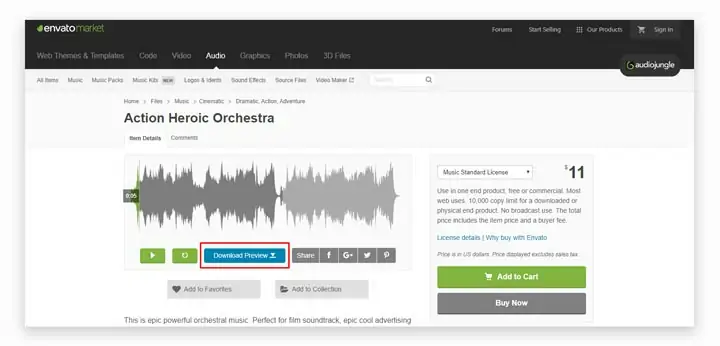 5. Import the Audio Preview file into Adobe Audition
6. Select the "AudioJungle" section you want to remove
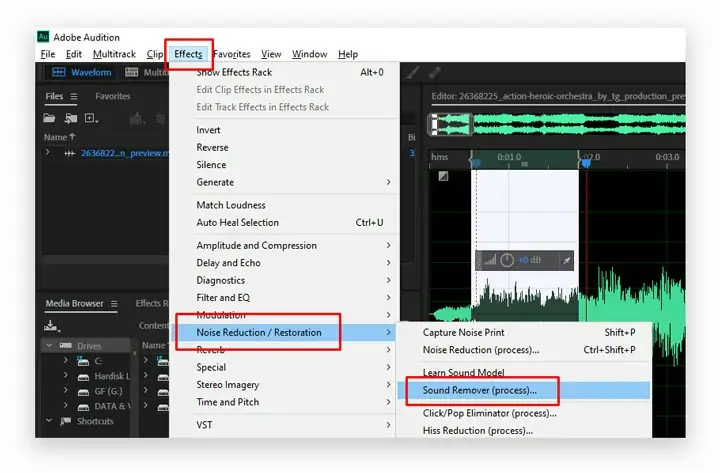
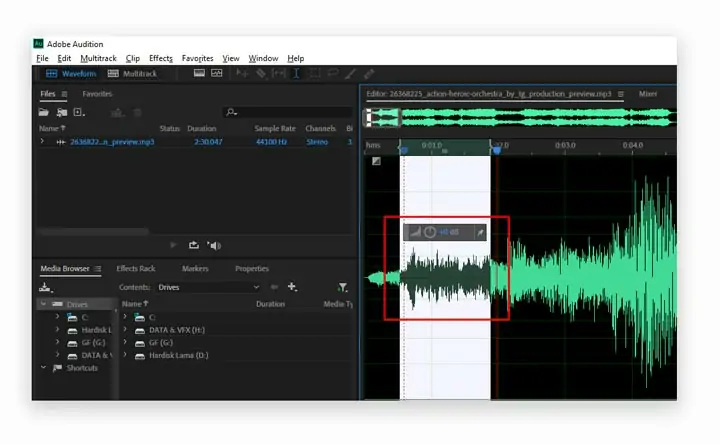 7. Next, go to the Effects menu> Noise Reduction> Sound Remover
 8. Then press the folder button (Load Sound Model)
9. Select the AudioJungle.srm file that was downloaded
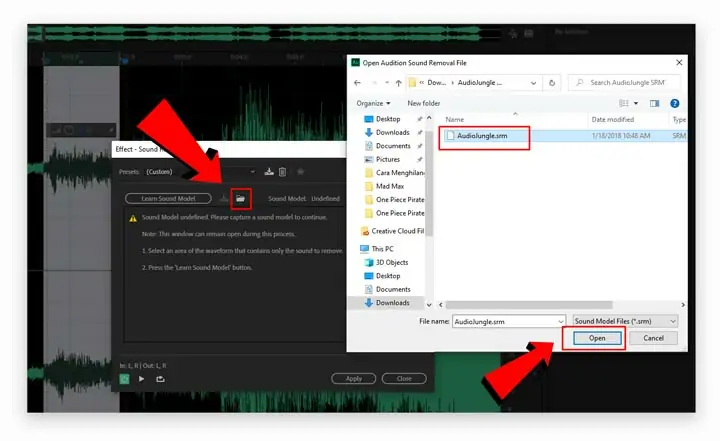 10. Set the default squat as below:
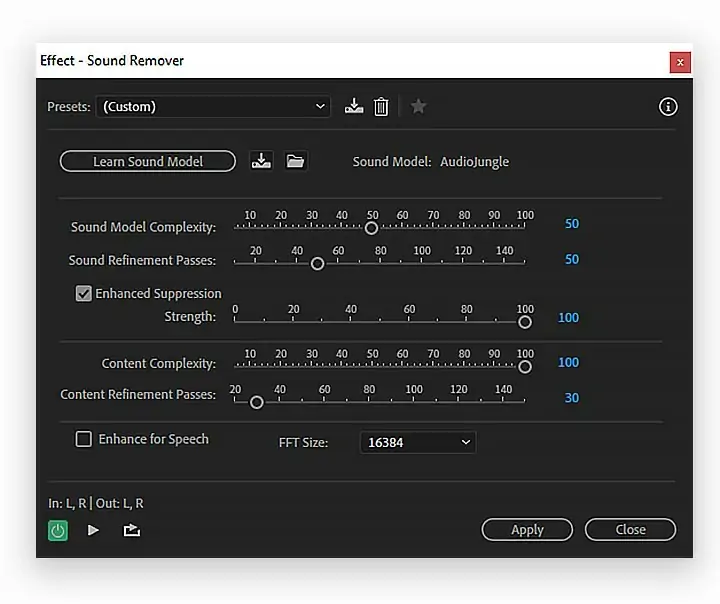
11. If the WaterMark AudioJungle sound is not gone, please upgrade the settings again
- Sound Model Complexity: Higher> Watermark sound disappears
- Sound Refinement Passes: To improve the quality of Music
- Enhanced Suppression: Mandatory to be checked,
- Strength: The higher, the sound of Water disappears
- Content Complexity: We recommend around 70 - 100 so that the original sound is not damaged
- Content Refinement Passes: Preferably between 20 - 50
- FFT Size: 16384 for better quality
12. After you test, now just press the Apply button
IMPORTANT NOTE:
The AudioJungle watermark sound appears every 10 seconds. So if the audio is 3 minutes, there are about 18 AudioJungle watermark sounds that must be removed manually. You must apply this method one by one on each watermark. Don't select music as a whole! Because we just want to eliminate the sound of the watermark, not reduce the quality of the music. Hopefully useful!
Currencies
Categories

Donate

What is CodecBlend
CodecBlend is web portal with one vendor ecommerce and provides free digital download like software, vector graphic, operating system, fonts, films, music video, video tutorial, templates, plugin, module, artwork, logo, component and many more..